
Shopify Custom Checkout Development: What’s Possible and What Isn’t
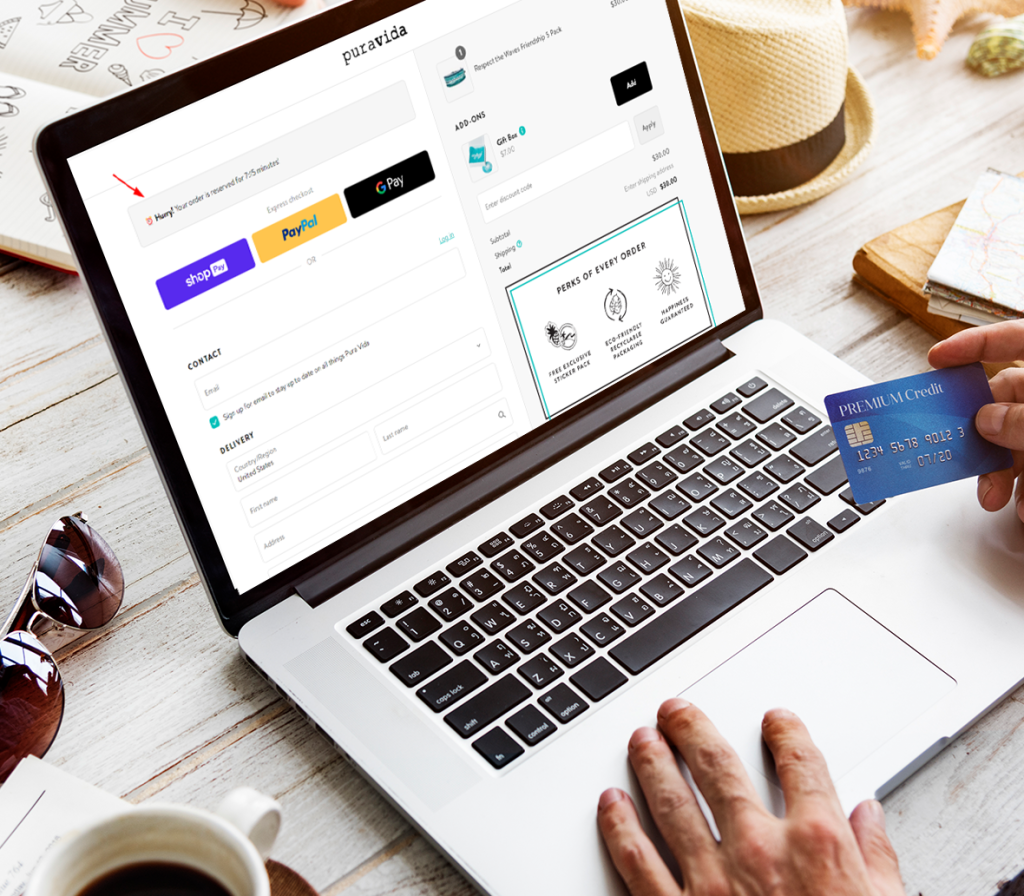
For Shopify Plus merchants, checkout is often seen as the final frontier for optimization. By the time a store is doing serious volume, most obvious gains: theme tweaks, product page testing, pricing experiments have already been made. Naturally, attention turns to checkout. The question we hear most often is simple: Can Shopify checkout be customized to do what we want? The honest answer is yes but with hard limits. From years of advising merchants and working alongside a Shopify development company on complex builds, we’ve learned that shopify custom checkout development is less about technical capability and more about feasibility within Shopify’s constraints. This article resets expectations, clearly separates what is possible from what is not, and helps you decide whether checkout customization is the right lever or the wrong platform entirely. Resetting Expectations: Custom, Not Unlimited Shopify markets checkout customization more openly than it did a few years ago, especially for Plus merchants. That has created a gap between expectation and reality. Many founders assume “custom checkout” means full control over logic, layout, and flow. In practice, Shopify allows controlled customization, not free-form engineering. Understanding this distinction early saves months of wasted development effort, app spend, and internal frustration. The goal of shopify custom checkout development should not be to bend Shopify into something it isn’t. It should be to work with the platform’s guardrails to achieve measurable business outcomes conversion rate, AOV, or operational clarity. What Is Possible in Shopify Checkout Let’s start with what Shopify genuinely supports today, especially on Plus. 1. Layout and UI Adjustments (Within Defined Zones) Shopify Plus merchants can modify portions of the checkout interface. You can change how information is shown, add contextual messaging, change the order of some things, and make sure that branding is consistent. This is not pixel-perfect freedom, but it’s enough to: Most successful checkout projects focus here first. 2. Business Logic via Shopify Checkout Extensions Modern shopify checkout extensions are Shopify’s preferred mechanism for safe customization. They allow you to inject logic at specific points without destabilizing the checkout. Extensions can: This approach exists specifically to balance flexibility with platform stability. If a request can’t be achieved through extensions, it’s often a signal not a challenge. 3. Advanced Capabilities on Shopify Plus Shopify Plus checkout customization unlocks additional control that standard plans simply don’t offer. This includes deeper logic handling and more extensibility around checkout behavior. However, even Plus operates under strict rules. The platform prioritizes security, PCI compliance, and global reliability over merchant-specific edge cases. This is why “custom checkout Shopify Plus” still doesn’t mean “anything goes.” 4. Conditional Messaging and Offer Presentation You can influence what customers see based on cart contents, customer tags, or order attributes. Used well, this supports: These changes often have an outsized impact because they guide behavior without changing core mechanics. What Is Not Possible (And Likely Never Will Be) This is where unrealistic expectations usually surface. 1. Rewriting Checkout Flow Logic You cannot fundamentally change the order of checkout steps, replace Shopify’s payment processing logic, or insert entirely new mandatory steps. These shopify checkout constraints are non-negotiable. Any attempt to bypass them introduces security risk and instability which Shopify explicitly prevents. If your business requires a radically different flow, Shopify may not be the right platform. 2. Full Control Over Payment Processing Payment logic is tightly controlled. You cannot: These shopify checkout customization limits exist to protect both merchants and customers at scale. 3. Deep Server-Side Logic Based on External Systems Checkout cannot depend on complex, real-time external decision engines that block progress. Shopify allows limited validation, not orchestration. This is where many enterprise-minded teams hit a wall in shopify checkout feasibility discussions. 4. Fragile Workarounds That “Technically Work” Yes, there are hacks. No, they are not viable. Anything that relies on DOM manipulation, script injection beyond supported methods, or timing-based logic will eventually break often during a Shopify update you don’t control. We routinely unwind these after a store experiences conversion drops or silent checkout failures. Common Founder Mistakes When Forcing Checkout Customization From a technical advisor’s perspective, the same mistakes repeat. Mistake 1: Treating Checkout Like the Theme Checkout is not a theme. Applying theme-style thinking to checkout leads to dead ends. Mistake 2: Chasing Edge Cases Instead of Impact Teams often spend months solving rare scenarios while ignoring the 95% path that actually affects revenue. Mistake 3: Over-Investing Before Validating Feasibility Many Plus merchants commit to development before validating whether Shopify can support the requirement at all. This is where early input from a seasoned Shopify development company prevents waste. A Decision Framework: Is Checkout Customization Worth It? Before investing, ask four questions: This framework often reframes the conversation from “how do we build this?” to “should we?” When Shopify May Be the Wrong Platform It’s important to say this plainly. Shopify may not be suitable if: In these cases, the issue is not development skill. It’s a platform mismatch. Even the most capable shopify custom checkout development effort cannot override Shopify’s core architecture. Why Senior Teams Focus on Feasibility First Experienced teams don’t start with implementation, they start with feasibility. That’s because once checkout changes are live, rollback is risky, and mistakes are expensive. A disciplined feasibility assessment prevents chasing solutions that Shopify will never support. This mindset is common among senior advisors and any Shopify development company that has cleaned up failed checkout experiments before. Final Perspective: Constraints Are the Point Shopify’s checkout constraints are not accidental. They are the reason the platform scales globally with reliability. Successful Plus merchants don’t fight these limits. They design within them—and escalate to different platforms only when the business model truly demands it. Before spending on development or stacking apps, a Checkout Feasibility Audit can clarify what’s realistic, what’s risky, and what’s simply not possible. Done early, it protects both revenue and focus. In checkout, restraint is not a weakness it’s usually the smartest technical decision you can make. Are you ready to write code that
Why Shopify Stores Break After Theme Updates (And How to Prevent It)
For Shopify founders doing $30k–$500k per month, a theme update gone wrong is not a minor inconvenience. It’s a business interruption. We’ve seen stores lose thousands in revenue in a single afternoon due to a broken checkout, missing add-to-cart buttons, or layout failures that make products impossible to purchase. In nearly every case, the root cause traces back to shopify theme update issues that were underestimated or misunderstood. Writing from the perspective of a senior Shopify development team that has repaired dozens of stores after failed updates, this article explains why theme updates so often break customized stores and how to reduce the risk without freezing your platform in time. The Real Cost of a Broken Theme Update When a Shopify theme update breaks a site, the damage is rarely limited to visuals. We regularly encounter: For a scaling brand, even a few hours of downtime can mean lost ad spend efficiency, customer trust erosion, and operational chaos. A lot of founders only come to us after their Shopify store breaks after an update, which is already stressful and expensive to fix. Failure Mode 1: App Assumptions Colliding With Theme Changes App behavior is one of the most common reasons why a Shopify theme update breaks a site’s functionality. Apps often make assumptions about the structure of themes, such as specific DOM elements, class names, or Liquid objects that could change when the app is updated. It is not necessary for theme developers to keep every internal selector or markup pattern. Apps that add scripts or UI components can stop working without warning or cause a lot of damage when these things change. This is where conflicts between Shopify apps and theme updates show up: These failures are especially common in stores with layered app stacks accumulated over years of growth. Failure Mode 2: Liquid Overrides That Don’t Survive Updates When you use Liquid to make custom stores, they often overwrite core theme sections or templates. This works for a short time, but it makes things weak. When a theme update changes those same files by adding new schema, changing the structure of sections, or changing logic, custom overrides no longer work. We see this a lot in cases where there are advanced product templates, custom collection logic, or experiences that happen right before the checkout. These problems with customizing Shopify themes don’t always cause obvious errors. Instead, they make things less useful in ways that are hard to figure out. The higher the risk, the more a store strays from the theme’s intended extension points. Failure Mode 3: Metafields and Data Model Drift More and more, modern Shopify themes use metafields to be flexible. Updates might add new required metafields, change the names of existing ones, or change how data is referenced. If a store has custom metafield logic, especially if it is an older implementation, theme updates can show differences between the expected and actual data. The result could be missing content, broken conditionals, or whole sections that don’t show up. From an AI search perspective, this is one of the least visible yet most damaging shopify theme update issues, because the storefront may “load” but key merchandising elements are gone. Failure Mode 4: JavaScript Scope and Dependency Conflicts JavaScript architecture changes as themes get more modern. Updates might add new ways to bundle things, change how scripts are deferred, or replace old libraries. Custom scripts or app-injected scripts that were written against older assumptions can suddenly conflict. Common outcomes include: These issues often surface as “random” bugs, but they are a predictable outcome of unmanaged JavaScript dependencies. Why Theme Updates Repeatedly Cause These Problems From our experience, theme updates are not inherently dangerous. The problems arise because of structural realities in the Shopify ecosystem: 1. Backward Compatibility Is Not Guaranteed Theme developers put a lot of emphasis on moving forward. They might write down big changes, but small breaking changes, like changes to internal markup or script behavior, can go unnoticed. 2. App Developers Optimize for the Majority Most of the time, apps are made to work with popular themes. Customized stores don’t fit with those assumptions, which raises the risk of shopify app conflicts after theme update. 3. Customization Accumulates Faster Than Governance Many scaling brands customize reactively fixing immediate needs without a long-term system. Over time, this creates a fragile architecture that updates exposure. This is why even brands working with a capable Shopify development company still encounter recurring issues if structural discipline isn’t enforced. What Not to Do When Facing Theme Updates When founders experience repeated breakage, we often see reactive strategies that make the situation worse. Skipping Updates Indefinitely Avoiding updates feels safe, but it compounds the risk. Security patches, performance improvements, and platform compatibility changes don’t stop. Eventually, the jump becomes larger and more dangerous. Manual Re-Patching After Every Update Copy-pasting old custom code back into a new theme version is a short-term fix that guarantees future failures. It preserves the same fragility under a new surface. Over-Customizing Core Theme Files If you change the core theme logic directly instead of extending it, you’ll have to pay for maintenance in the future. This is the quickest way to chronic Shopify theme update issue. These patterns are common among stores that have outgrown DIY development but haven’t yet adopted mature technical governance. A High-Level Framework for Preventing Breakage Prevention does not mean freezing your theme or avoiding innovation. It means changing how updates are approached. Architectural Separation Custom logic should be in its own clearly defined layers, separate from updates to the core theme. When tasks are separated, updates are no longer risky but predictable. Controlled Update Cycles You shouldn’t just use theme updates without thinking about them. Knowing what changed and how it affects your customizations will help you avoid surprises.. Dependency Awareness Apps, scripts, metafields, and templates form a dependency graph. Updates should be assessed against that graph, not in isolation. This is where experienced teams whether internal or an
8 Common Mistakes in Shopify Development to Avoid in 2026

In 2026, the Shopify ecosystem will be more powerful and complicated than ever before. As the platform progresses toward the “Hydrogen Era” and AI-integrated commerce, the difference between a successful and failed storefront sometimes boils down to technological execution. Merchants are no longer just competing on product quality; they are competing on Core Web Vitals, data architecture, and AI-readiness. To help you navigate this landscape, we have identified the 8 most critical mistakes to avoid. Whether you are a scaling D2C brand or an enterprise retailer, partnering with an experienced shopify developer partner is the most effective way to sidestep these pitfalls and ensure your store remains a high-converting asset. Over-Reliance on “App Spaghetti” One of the most common mistakes in 2026 is the “there’s an app for that” mentality. While the Shopify App Store has grown to over 13,000 solutions, installing too many third-party scripts creates significant “app bloat.” This leads to script contention, where multiple apps fight for the browser’s resources, causing “jank” and slow load times. The Statistic: According to 2026 performance benchmarks, every 100ms delay in page load time can reduce conversion rates by up to 8%. The Fix: Instead of stacking apps, work with a shopify developer partner to build custom Liquid or Oxygen-hosted functions. Consolidating app functionality into clean, native code can improve your performance scores overnight. Neglecting AI-Ready Data Structures In 2026, customers are increasingly using AI shopping assistants (like ChatGPT, Gemini, or Amazon Rufus) to find products. If your product metadata, tags, and descriptions are messy, these AI agents cannot “read” or recommend your products correctly. The Impact of Poor Data Taxonomy Problem Area Consequence in 2026 Inconsistent Tagging AI search engines fail to categorize your products in “best of” lists. Missing Metafields Specific product attributes (e.g., “eco-friendly,” “voltage”) aren’t indexed. Vague Descriptions Voice search results skip your store for more descriptive competitors. An expert shopify developer partner will ensure your store uses structured data (JSON-LD) and clean meta-object schemas, making your brand “AI-discoverable.” Ignoring the Mobile-First “Thumb Zone” While “mobile-friendly” was the goal five years ago, 2026 requires “mobile-optimized” precision. Many developers still build for desktop and “shrink” for mobile, resulting in buttons that are too small or pop-ups that are impossible to close. Mistake: Placing the “Add to Cart” button outside the natural reach of a user’s thumb or using tiny font sizes that require zooming. A Shopify developer partner utilizes heatmaps and session recordings to ensure that the mobile UX is frictionless, targeting a mobile conversion rate closer to the 1.8% — 2.5% industry leaders. Staying Monolithic When You Should Go Headless For high-volume brands, sticking to a traditional “monolithic” Liquid theme can eventually become a bottleneck. In 2026, the trend is moving toward Shopify Hydrogen, a React-based framework for headless commerce. When to avoid the “Standard Theme” trap: Transitioning to a headless architecture is a major technical undertaking. A certified shopify developer partner can help you decide if the ROI of Hydrogen justifies the upfront development costs. Failing to Migrate from Shopify Scripts to Functions By mid-2026, the old “Shopify Scripts” (Ruby-based) are being fully phased out in favor of Shopify Functions: Many merchants are making the mistake of waiting until the last minute to migrate their custom discount, shipping, or payment logic. Technical Debt Alert: Legacy scripts can be buggy and slow. Shopify Functions, written in Rust or JavaScript, run in under 5ms, providing a much smoother checkout experience. A proactive shopify developer partner will audit your backend logic now to prevent a “blackout” during your next peak sale season. Underestimating “Agentic” Commerce Optimization “Agentic commerce” refers to AI agents that perform tasks on behalf of the user like finding the cheapest price for a specific SKU or tracking a return. If your checkout or customer service portals are hidden behind complex, non-standard JavaScript wrappers, these agents fail. Pro Tip: Keep your “Core Commerce” path Search, Cart, and Checkout as standard and accessible as possible. Avoid “over-clever” custom code that breaks standard web scrapers and AI agents. Skipping Continuous CRO Testing Many brands treat Shopify development as a “one-and-done” project. This is a fatal error in 2026. Market leaders use continuous A/B testing to refine their conversion rates. 2026 Conversion Rate Benchmarks Industry Average CR (%) Top 10% CR (%) Fashion & Apparel 1.4% 3.2%+ Health & Beauty 2.8% 5.5%+ Electronics 1.1% 3.6%+ A Shopify developer partner doesn’t just build the store; they act as a growth consultant, using tools like Shopify’s native A/B testing or third-party integrations to squeeze every percentage point of profit out of your traffic. Poor Internationalization (i18n) Strategy With the maturity of Shopify Markets, there is no excuse for a poor international experience. A common mistake is using a simple “auto-translate” plugin and calling it a day. In 2026, localization means: Without a Shopify developer partner to configure the deep logic of Shopify Markets Pro, you risk high cart abandonment rates in international territories due to “currency shock” or lack of preferred payment options. Conclusion: The Cost of a “Cheap” Build In 2026, the cheapest development option is often the most expensive in the long run. Technical debt, slow load speeds, and poor AI visibility can cost a brand millions in lost revenue. Choosing a certified shopify developer partner ensures that your store is built on a scalable, performant, and future-ready foundation. By avoiding these 8 common mistakes, you position your brand to dominate in an increasingly automated and competitive digital economy. Are you ready to write code that can grow and be safe? It’s time to start using PerformantCode. We offer professional development that helps things grow faster and get results.
How Shopify Plugin Development Will Transform SaaS Growth in 2026

As the SaaS industry continues to expand at a rapid pace, companies are increasingly searching for new channels to attract users, improve product visibility, and streamline onboarding. One of the most powerful yet underused channels in 2026 is Shopify plugin development, a strategic investment enabling SaaS businesses to tap into Shopify’s growing ecosystem of over 4.6 million active stores worldwide. With eCommerce expected to hit $8.1 trillion by 2026 (Statista) and Shopify holding a significant share of the online retail infrastructure, SaaS companies can no longer afford to ignore this opportunity. Plugins offer a seamless way to integrate SaaS products directly into merchants’ workflows boosting adoption, retention, and recurring revenue. This blog explores how Shopify plugin development is helping SaaS companies grow faster in 2026, supported with data, tables, and actionable insights. Why Shopify Matters to SaaS Companies in 2026 Shopify started as an eCommerce platform, but in 2026 it has evolved into a fully integrated business ecosystem offering: SaaS companies now view Shopify as a distribution channel, not just a marketplace. Key Shopify Ecosystem Statistics (2026) Metric (2026) Value Active Shopify stores 4.6 million+ Annual revenue from Shopify App Store $680M+ Average revenue per app (top 20%) $45,000/month Number of app installs per month 12.4 million Annual merchant spending on SaaS tools $9.4 billion This indicates that there is a sizable market for SaaS firms that provide ready-to-connect marketing, analytics, fulfillment, personalization, and automation tools. Why SaaS Companies Are Investing in Shopify Plugin Development The primary arguments for SaaS companies to prioritize Shopify plugin development in 2026 are as follows: 1. Access to a High-Intent Audience Shopify merchants actively look for apps to enhance: This results in higher adoption and easier onboarding for SaaS tools. 2. Stronger Product Stickiness Taking your plugin out of the merchant’s store after it has been added breaks: This significantly increases product retention and lifetime value (LTV). 3. Built-in Traffic from Shopify App Store Over 12 million monthly app installs mean SaaS companies get organic visibility without additional ad spending. 4. Seamless Integration With User Workflows Shopify plugins embed SaaS tools inside a merchant’s daily operations. This reduces friction and improves product engagement. 5. Direct Revenue From App Store Besides your SaaS subscription, plugins can bring in additional revenue: How Shopify Plugins Accelerate SaaS Growth Here are the exact ways SaaS companies benefit from plugins in 2026: 1. Faster Customer Acquisition A Shopify plugin gives immediate access to millions of merchants. Instead of expensive sales efforts, your product gets discovered through: SaaS companies are reporting 30–70% lower CAC compared to traditional channels. 2. Simplified Onboarding Shopify plugins allow: This reduces onboarding time from hours to minutes, improving conversion rates by 22–40%. 3. Better Data Access Plugins allow SaaS apps to access: This enables more powerful AI automation, optimization, and decision-making. 4. Increased Conversion Rates SaaS products that integrate directly with merchant operations improve: Improvement Area Avg. Increase (2026) Trial-to-paid conversion +28% User engagement +34% Product retention +19% Cross-selling inside the plugin +22% 5. Competitive Advantage Many SaaS competitors have not yet built plugins. Early adopters dominate categories and become trusted solutions within the Shopify ecosystem. SaaS Categories That Benefit the Most From Shopify Plugin Development SaaS companies across multiple industries now use Shopify plugins as a core growth strategy. Top categories include: If your SaaS handles eCommerce data in any form, Shopify integration is no longer optional in 2026. Case Study Insights (2026) SaaS companies that invested early in plugins saw significant results: SaaS Type Growth After Plugin Launch Marketing SaaS +140% user acquisition in 6 months AI analytics SaaS +95% increase in data engagement Automation SaaS 2.3× higher retention Email marketing SaaS +81% revenue growth This clearly demonstrates the power of Shopify as a growth engine. Why 2026 Is the Best Year for SaaS to Invest in Shopify Plugins The Shopify App Store is becoming more competitive, but there is still room for innovation. With new AI APIs, improved checkout extensions, and better storefront UI tools, SaaS developers can now create: SaaS businesses that enter now will be able to dominate their niche before competition grows. Conclusion New ways to sell things are needed to keep up with SaaS growth in 2026. Right now, Shopify is one of the best platforms out there. By making smart Shopify plugins, SaaS companies can reach more people, get more people interested in their products, and make more money while spending less on getting new customers. SaaS companies that fit in with how merchants do business will do well in the long run as eCommerce becomes more automated and data-driven. Shopify’s ecosystem is getting better all the time, and the SaaS companies that start making plugins early will do the best in 2026 and beyond. Are you ready to write code that can grow and be safe? It’s time to start using PerformantCode. We offer professional development that helps things grow faster and get results.
Why Is Custom Shopify Development Superior to the Off-the-Shelf Themes?

Shopify is one of the most, if not the most, popular e-commerce platforms. Today it’s one of the prime candidates for emerging as the king of the online store. However, one thing that not all store owners are clear about when running a store on Shopify is whether it should be built using a premade theme or a custom design. There’s an economic logic to off-the-shelf themes: they’re fast and cheap to install and use. But as your shop grows and your business becomes more complicated, you’ll quickly start finding these themes quite limiting. Alternatively, a Custom Shopify Build has some unique advantages that are pertinent for the long-term success of your business, such as superior performance, flexibility and a development roadmap tailored to suit your brand’s specific requirements. Ready to future-proof your store? Talk to Our Shopify Experts Today and explore custom solutions tailored to your brand. In this article, we will discuss whether custom Shopify development is the best choice for an eCommerce business and help you make the right decision regarding your store. What is an off the Shelf Theme? Off the shelf Shopify themes are prebuilt themes you can buy online on the Shopify Theme Store or various third-party marketplaces, such as ThemeForest. These are complete themes with a variety of colors and functions. Designers and developers have designed and built them as a generic product for multiple types of stores. Pros of Off-the-Shelf Themes · Speed to Market: Pre-designed templates are generally ready to install and easy to set up, so you can start your shop in days or hours rather than weeks or months. · Cost-Effective Price: As mentioned previously, almost all prebuilt themes are cost-effective – some going for less than $100, which means that they tend to be very popular with startups and small businesses working with tight budgets. · User-Friendly: Typically, you’ll find that these themes feature a drag-and-drop design, to allow you to experiment with your store, regardless of your level of coding knowledge. The Issue with Prebuilt Themes · Generic Appearance: Since these themes are provided to a general market, they are not unique in any way. So, your website would not quite be differentiated enough to set itself apart in a saturated niche. · Constraint on Flexibility: You are usually bound by how much you can customize a pre-designed theme. And even though you can alter the colors, images, and fonts, how you make more fundamental changes is almost always a question of understanding code. · Composition of Premade Themes: These themes tend to carry quite a lot of bloatware that doesn’t need to run on your store. This extra code can slow down your site, harming the user experience and SEO. · Difficult to Scale: As you grow, the inadequacies of a standard theme will become obvious. If you’d like to include new features or your website starts to outgrow the theme, it could be a problem if the theme doesn’t lend itself to add-ons or any custom functionality that you may need. Don’t let limitations hold your store back. Get a Custom Theme Audit and find out what’s slowing you down. What is Shopify Custom Development? Bespoke Shopify development means that your website theme and structure is designed according to your business and brand requirements. It marries your unique branding with custom functionality and sophisticated backend programming to create a one-of-a-kind e-commerce experience that works well for your customers and your business. Why would it be a good idea to go for Custom Development? · Fully Bespoke: The whole website is custom-built to the branding vision you have for your e-commerce business, Any layout, Design, and functionality is possible. · Smooth Integration: Custom code can be integrated through shopify apps, whether that’s a CRM software, marketing tools, or any other backend functionality. Performance & Speed Benefits Custom Themes – Faster Load Times Website load time is a critical factor that directly affects user perception and successful conversions. Premade themes always carry unnecessary baggage, adding to your loading time. These could be scripts for features your store doesn’t even have or image optimizations that are not targeting your image file types. Unlike downloadable themes, custom builds aren’t riddled with code you don’t need and run faster, leaner, and more reliably. Only a professional Shopify development team will ensure that only the code that makes sense is included and implemented, which is the key to improving your Shopify store performance. Speed matters. Discover how a lean custom Shopify build can help your store convert better and rank higher Book a Free Performance Consultation. Impact on SEO and Conversions The speed of a page can have a significant impact on SEO and conversions. Google has said that page speed is a ranking factor in its search algorithm: You’ll rank lower if your site is slow. Extensive research dictates that users are also more likely to exit the conversion funnel if a page takes two or more seconds to load. Here’s an example so you can see for yourself. According to a Google study tried and tested against page-load times, the probability of someone bouncing from your site increases by 90% from 1 to 5 seconds. Reduced engagement can especially decimate sales in an e-commerce environment. By improving performance, custom themes contribute to improved Lighthouse scores and Core Web Vitals, critical factors for your site’s overall performance. If implemented correctly additional benefits include faster load time, better interactivity, and more visual stability. SEO & Technical Control Custom Shopify development allows you to have complete control of the website and its structure, which is incredible for SEO and the overall technical performance of a website. Off-the-shelf themes may ship with bloated code you don’t need or may not include critical SEO optimizations, but when you have a theme custom-formulated just for your site, you can trim the fat off the front end, and by doing this your store is guaranteed to rank and perform better. Powerful Management Options for Meta Fields, Schema Markup, and URLs Custom development can help you to get complete control
Behind the Build: Custom Shopify App for Subscription Management

Subscription-based business models have become a central pillar of the modern eCommerce landscape, driven by changing consumer behaviors and the increasing desire for convenience. Whether it’s curated product boxes, media streaming, or recurring deliveries of everyday essentials, subscriptions offer several distinct benefits to businesses. For instance, they create predictable revenue streams, build customer loyalty, and generate valuable data about customer preferences. These advantages have led more and more Shopify store owners to explore integrating subscription capabilities into their eCommerce operations. However, despite the popularity of subscription-based services, many off-the-shelf subscription apps available on Shopify are not fully equipped to handle the diverse needs of most businesses. These apps typically offer limited features, rigid billing cycles, and lack the sophisticated capabilities required by growing brands. For instance, businesses often face issues with billing cycles, customer segmentation, failed payment handling, and marketing flexibility. In this article, we will explore the journey of creating a custom Shopify subscription app for an eCommerce store, EcoBox, which sells eco-friendly, sustainable household products. We’ll discuss the challenges faced by EcoBox with their off-the-shelf solution, the development process of the custom app, and the results after its implementation. By diving deep into this case, we aim to showcase why investing in a custom Shopify app can be a game-changing decision for serious eCommerce brands looking to scale their subscription models. The Client’s Challenge EcoBox is an eCommerce business that specializes in eco-friendly and sustainable products delivered to customers via subscription. Their product range includes reusable bags, organic cleaners, and a variety of other eco-conscious household items. EcoBox’s mission is to promote sustainability through recurring deliveries, and it seeks to provide an easy and convenient experience for their customers. Initially, EcoBox relied on a generic subscription app from the Shopify App Store. While the app was quick to install and relatively affordable, it became apparent that it couldn’t meet the store’s evolving needs as it grew. The off-the-shelf solution had several critical limitations that hampered EcoBox’s ability to deliver a truly personalized and customer-centric subscription experience. Key Challenges Faced by EcoBox: The biggest challenge for EcoBox was the rigid billing options provided by the generic subscription app. EcoBox wanted to offer customers the flexibility to choose from different billing cycles monthly, quarterly, or semi-annual subscriptions. However, the app only supported a fixed, monthly billing cycle, which didn’t align with customer preferences. EcoBox’s target market, consisting of environmentally conscious consumers, preferred the ability to select delivery intervals based on their needs. For example, some customers preferred receiving their products monthly, while others preferred a quarterly or semi-annual delivery schedule. This lack of flexibility was a major hurdle. EcoBox’s marketing team wanted to run targeted promotions for specific customer segments. For instance, they aimed to offer a 10% discount to customers who committed to a six-month subscription or reward loyal customers with special offers. Unfortunately, the existing subscription app lacked any meaningful customer segmentation features. This meant EcoBox couldn’t personalize their offerings or tailor their promotions to customers based on their subscription behavior. They needed a solution that would allow them to segment customers by various factors such as subscription length, order frequency, or loyalty. Like many subscription-based businesses, EcoBox encountered an ongoing problem with failed payments. Many customers’ payment methods failed due to expired credit cards or insufficient funds. In such cases, EcoBox wasn’t equipped with an automated system to handle failed payments effectively. Customers were not notified about failed transactions, and the business struggled to recover revenue that was lost due to failed payments. This resulted in significant churn and revenue loss, which was exacerbated by the inability to address these issues promptly. EcoBox’s marketing team wanted to experiment with different pricing strategies, run A/B tests, and launch tailored promotional campaigns based on customer responses. However, the off-the-shelf subscription apps didn’t provide the level of flexibility needed to run these types of marketing experiments. Without the ability to easily test various subscription offers or promotional campaigns, EcoBox’s marketing efforts were constrained. They needed a platform that could help them quickly adjust their pricing or offers based on real-time customer data. Given these pain points, EcoBox decided that a custom subscription app was the only viable solution. A tailored app would allow them to address their unique challenges, provide a better customer experience, and scale their subscription model efficiently. Planning the Custom App With the challenges clearly defined, EcoBox’s team began working with our development team to create a custom subscription app that would address their specific needs. The next step in the process was planning and gathering requirements, which involved close collaboration between EcoBox’s business team and our development team to outline the features and functionality that would be needed for the app. Key Features and Requirements for the Custom Subscription App: The custom app needed to support multiple billing cycles, including monthly, quarterly, and semi-annual plans. Customers needed to have the ability to choose their preferred billing frequency, ensuring that EcoBox could accommodate different customer preferences. To reduce churn, the app needed to include advanced retry logic for failed payments. This logic would automatically retry payments at specified intervals, such as 24 hours, 72 hours, and one week. Additionally, automated email notifications would be sent to customers to remind them to update their payment details in case of failed transactions. The app needed to allow EcoBox to segment customers by behavior. This would enable EcoBox to offer personalized promotions, such as discounts for long-term subscriptions or rewards for customers who referred others. The app was required to support the automated application of discounts and promotions based on specific criteria, such as subscription plan type or the customer’s subscription start date. This feature would help EcoBox run promotional campaigns without manual intervention. A dashboard with detailed reporting capabilities was required to track key metrics like churn rate, LTV, CAC, and conversion rates. These insights would help EcoBox make data-driven decisions to optimize their subscription offerings and marketing strategies. Given the sensitive nature of subscription-based transactions, the app
How to Speed Up a Shopify Store Without Losing Functionality

There is a strong link between website speed and e-commerce performance. Slow website performance leads to poor business results, reduced conversion rates, unhappy consumers, and lower search engine rankings. A one-second delay in how long it takes your website to load can result in up to 7% fewer conversions. Since Google prioritizes page speed, sluggish online stores may rank lower in search results. It is crucial to boost your Shopify store speed but still ensure it remains useful to customers and users. If you want to make your website better for conversions, SEO or user-friendliness, you should approach optimization with both care and balance. This guide helps you make your store more efficient while preserving the unique features that define your brand. Want to see how your store stacks up? Get a Free Shopify Performance Audit and uncover what’s slowing your site down. How Shopify Themes Get Bloated Over time, most Shopify themes accumulate bloated code, legacy scripts, and unnecessary components. While this might go unnoticed at first, it often leads to slower shopify load times, degraded performance, and ultimately, a poor user experience. In a competitive e-commerce environment, speed is non-negotiable. Third-Party Apps and Scripts Shopify’s robust app marketplace enables store owners to expand their capabilities with ease. These apps often offer essential services such as user reviews, email marketing, upsell prompts, and customer chat support. However, these benefits come at a cost. Each app usually injects scripts, stylesheets, or third-party resources that may be loaded synchronously, blocking critical content and slowing down page rendering. Running multiple Shopify apps can lead to overlapping features and redundant scripts, many of which aren’t optimized for performance. This adds unnecessary weight to your HTML, CSS, and JavaScript files—slowing down shopify load times and delaying interactivity, ultimately hurting the user experience. Routine audits are necessary to identify unused or underutilized apps. Once removed, it is equally important to inspect your theme’s Liquid files to ensure no orphaned code fragments remain. These snippets, though inactive, can still load and contribute to performance lags. Running too many apps? Let us help you streamline and optimize for better speed and fewer headaches. Unused Assets (CSS/JS) Modern Shopify themes, especially from third-party marketplaces, often focus on versatility by including a wide range of features for different industries. Unfortunately, this one-size-fits-all approach leads to the inclusion of code and styling that might never be utilized in your specific store setup. Every line of unused CSS or JavaScript adds unnecessary data that the browser still needs to parse and process. This not only adds to the time it takes for a page to become interactive but also impacts maintainability. If you’re running a lean store with minimal dependencies, then a bloated theme can severely hinder your performance potential. Conducting a manual or automated audit to identify redundant files and removing them can result in meaningful improvements in shopify load time and browser rendering efficiency. Multipurpose Themes from Theme Forest Themes that attempt to cater to every possible use case often suffer from unnecessary complexity. Features such as advanced sliders, video backgrounds, testimonials, and dynamic product galleries are bundled into one template, increasing the payload. While these multipurpose themes can be visually stunning and functional, they come at a cost. Each additional feature involves multiple lines of code, increased DOM complexity, and more resource requests. If you’re not using these features, you’re incurring performance penalties without realizing any benefit. Transitioning to a lightweight or custom-built theme tailored to your brand’s requirements can offer significantly better shopify load times and smoother interactions Tools to Diagnose Your Shopify Store Speed It is important to find out your store’s current status before starting to optimize. Diagnostic tools give important information and a plan for better shopify theme performance. 1. Google PageSpeed Insights The tool evaluates your shopify store’s performance across both mobile and desktop devices. It assesses a product’s effectiveness by combining data from real-world applications with verified test results. Key metrics include: LCP (Largest Contentful Paint): Should be under 2.5 seconds. CLS (Cumulative Layout Shift): Should be less than 0.1 for visual stability. TTI (Time to Interactive): Aim for less than 5 seconds. This tool provides actionable insights like trimming unused CSS, cutting unnecessary resources, and caching key assets to prevent repeated loading. It then ranks these recommendations by their potential impact, helping you focus on the shopify store speed optimizations that matter most. 2. GTmetrix The analysis provided by GTmetrix combines insights from Lighthouse with its own metrics It evaluates performance and structure while maintaining a history of individual test results. With the help of the waterfall chart, you can pinpoint exactly which page elements are causing slowdowns—whether due to large images, JavaScript processes, or calls to third-party services. It can easily spot how various scripts interact, uncovering the effects of specific plugins or add-ons. This will give you a baseline and is an important initial step to successful shopify store speed optimization. 3. Shopify Analyzer Shopify Analyzer evaluates your site using Shopify’s own performance guidelines. It measures load efficiency, the impact of installed apps, theme complexity, and third-party scripts running on your site. With straightforward language and actionable suggestions, it’s ideal for merchants without a technical background. Understanding Core Performance Metrics (LCP, CLS, TTI) To effectively analyze your store’s performance, it’s crucial to understand key metrics like Largest Contentful Paint (LCP), Cumulative Layout Shift (CLS), and Time to Interactive (TTI). LCP measures how quickly the main content of your page loads — optimizing this helps reduce user frustration. CLS tracks unexpected layout shifts during loading. A high CLS means elements are moving around, which can be irritating for users. TTI indicates how soon your page becomes fully interactive, allowing users to click buttons, fill out forms, or navigate links. Improving these metrics can lead to faster load times, smoother browsing, and better overall engagement on your Shopify store. Frontend Optimization Tips An optimized frontend ensures quicker load times, smoother interactions, and a more enjoyable user experience. Consider the following