
Why Page Builders Hurt Shopify Performance More Than You Think

If you’re a founder using a shopify page builder to launch campaigns faster, you’re not wrong. They feel efficient. Marketing can move without Shopify developers. Landing pages ship in hours instead of weeks. But here’s the uncomfortable truth: Performance loss is a margin tax. Every extra second your store takes to load quietly increases acquisition costs, reduces conversion rate, lowers ROAS, and inflates bounce rate. You don’t see it as a direct expense on your P&L, but it compounds across every paid click. As a performance engineer who has diagnosed and contained dozens of builder-heavy Shopify stores, I can tell you this: most founders underestimate the structural cost of convenience. This article breaks down: No vendor talk. No hype. Just operational reality. Performance Loss Is a Margin Tax When you scale ads, small inefficiencies become expensive. Let’s say: That “minor” drop costs thousands per month. Often, the cause is not product-market fit. It’s not creative fatigue. It’s not even pricing. It’s page weight, script execution time, and layout instability caused by builder architecture. Performance isn’t cosmetic. It’s financial infrastructure. How a Shopify Page Builder Slows Stores Most founders think page builders are just visual layout tools. They’re not. They are runtime engines layered on top of your theme. Here’s what that means in practical terms. 1. Excessive Script Loading A typical shopify page builder injects multiple JavaScript bundles into every page it controls. These scripts: Even if your page only uses 30% of builder features, 100% of the core runtime often loads. The result: This is a common root cause of “page builder slow shopify” complaints. 2. DOM Bloat Builders generate nested containers to support drag-and-drop flexibility. Instead of: Section – Row – Content You often get: Section – Wrapper – Container – Flex Row – Column – Inner Column – Block – Text Wrapper – Text Multiply that across 40-60 sections on a long-form page and you get: Mobile devices suffer the most. This is one of the core shopify page builder issues affecting Core Web Vitals. 3. Render-Blocking Behavior Some builder scripts: That leads to: This is where shopify core web vitals page builder problems begin to show up in Lighthouse and Search Console. You don’t just lose speed. You lose stability. 4. Duplicated CSS and JS Because builders operate independently from your theme: Now add: You’re stacking multiple runtime systems on top of each other. The site becomes a script marketplace instead of a coherent application. This is one of the most overlooked shopify page builder drawbacks. The Hidden Costs Beyond Speed Speed is only half the story. Builder-heavy stores also suffer operational damage. 1. Inconsistent User Experience Because builders allow full design flexibility: This inconsistency reduces trust. Users subconsciously notice when a store feels stitched together. Brand credibility suffers. 2. QA Overhead Increases When marketing can change layout without technical oversight: Founders don’t notice until: Then the debugging begins. This is where shopify page builder issues become operational debt. 3. Fragile Updates Theme update? Something breaks. App update? Styling shifts. Builder update? Custom CSS overridden. You end up in a fragile state where: Ironically, the tool meant to increase speed reduces it long term. 4. Analytics Noise Builders often: This leads to: If your measurement layer is unstable, you can’t optimize confidently. Performance engineering isn’t just about load time. It’s about data integrity. Why Shopify Site Speed Builders Hit Harder at Scale Small stores don’t always feel the pain. But once you scale: Now your shopify site speed builders issue compounds. The system that worked at $20K/month becomes fragile at $200K/month. Scaling exposes structural weakness. Decision Framework: When Are Builders Acceptable? Let’s be balanced. A shopify page builder isn’t always wrong. Here’s when it makes sense: Acceptable Use Cases In these cases, speed of execution matters more than perfect architecture. But here’s the line: If the builder becomes core infrastructure not just experimentation you’re taking on technical debt. When It’s Time to Move to Theme Sections or Custom You should strongly consider migrating when: At this stage, builder convenience is costing you margin. The Mitigation Roadmap (Without a Full Rebuild) Good news: You don’t have to rip everything out tomorrow. Here’s how I typically contain builder damage. 1. Isolate Builder Usage Don’t let it control: Keep it limited to campaign landing pages. Reduce systemic impact. 2. Remove Unused Features Audit: Disable what isn’t actively needed. Most stores run 30 – 40% unused builder logic. 3. Consolidate CSS and Fonts Eliminate: Unify styling under your theme where possible. 4. Prioritize Core Web Vitals Focus on: You don’t need perfect scores. You need commercial performance stability. 5. Gradually Rebuild High-Revenue Pages Start with: Rebuild them natively inside theme sections. Reduce runtime dependency over time. 6. Implement Script Governance Every script should answer: If not, it shouldn’t be there. The Real Trade-Off Builders trade: Non-technical founders often optimize for speed of deployment. But when scaling, you must optimize for speed of experience. There’s a difference. A fast marketing team doesn’t matter if the site is slow. The Founder’s Perspective: What You Should Actually Do Be honest with yourself: You don’t need to become technical. But you do need visibility. If you’re spending aggressively on traffic and not auditing performance architecture, you’re flying blind. Performance Is Revenue Infrastructure A shopify page builder isn’t evil. It’s a tool. But tools used beyond their intended scope create drag. If your store feels: Builder architecture is often part of the equation. The fix doesn’t require panic. It requires clarity. Soft Next Step: Shopify Performance Cleanup Audit If you’re unsure whether your store is paying a hidden performance tax, a structured performance review can surface: A Shopify Performance Cleanup Audit doesn’t just give you speed scores. It gives you a prioritized roadmap tied to revenue risk not vanity metrics. Because at scale, performance isn’t technical. It’s financial. And ignoring it gets expensive. Conclusion In the end, a page builder is not the enemy unmanaged complexity is. What starts as a fast marketing shortcut
The True Cost of Manual Workarounds in Shopify Operations

Your Operations Team Is Compensating for Your Store’s Technical Gaps and the Cost Is Larger Than Your Accounts Show The Operational Overhead Nobody Budgets For Every scaling Shopify business has them. The spreadsheet that someone updates every morning to reconcile inventory between Shopify and the warehouse system. The order processing step that requires a team member to manually tag certain orders before they route correctly. The discount cannot be applied automatically, so customer service handles the requests individually. The B2B pricing exception that lives in someone’s inbox because the store cannot enforce account-specific rules without manual intervention. The refund process involves three separate systems because the integration between them was never completed. These manual workarounds are so embedded in daily operations that most teams no longer question them. They were introduced one at a time, each in response to a specific gap between what the Shopify store could do and what the business needed it to do. Each felt like a reasonable temporary solution at the time. Collectively, over months and years, they have become the operational infrastructure of the business, a parallel system of human effort sitting alongside the technology that was supposed to automate it. The problem is not that workarounds exist. Every business has them. The problem is that their true cost in staff time, in error rate, in scaling constraint, in the opportunity cost of team capacity directed at compensating for system gaps rather than at commercial growth is almost never calculated and almost always significant. Understanding that cost clearly is the prerequisite for making the development investments that eliminate it, and for recognizing that those investments are not overhead expenditure but commercial return. How Manual Workarounds Accumulate and Why They Are So Difficult to See Clearly Manual workarounds in Shopify operations accumulate through a specific and recognizable pattern. A gap emerges between what the platform does and what the business needs. The gap is identified, assessed, and determined to be addressable through a manual process that the team can handle without disrupting the operation. The manual process is implemented. The business moves on. What the assessment rarely accounts for is the compound trajectory of that manual process over time. A workaround that takes one team member fifteen minutes per day at the time of its introduction takes thirty minutes at twice the order volume, forty-five minutes when product complexity increases, and an hour when the associated reporting requirements grow. The workaround also creates dependencies: other processes are built around the assumption that it runs correctly, which means that when it fails when the person responsible is absent, when the step is missed during a high-volume period, when the data it produces is incorrect the downstream consequences are proportionately larger than the step itself would suggest. The specific categories of manual workaround that impose the highest cost in Shopify operations cluster around four areas of common platform limitation. Inventory synchronization between Shopify and external systems is the most pervasive source of manual operational overhead for merchants running omnichannel or multi-location operations. Shopify’s native inventory management handles single-location and basic multi-location scenarios reliably. For merchants whose inventory is managed through a dedicated ERP system like NetSuite, SAP Business One, Microsoft Dynamics, or Cin7 the synchronization between Shopify’s inventory records and the ERP’s is a persistent integration challenge. When the integration is incomplete, unreliable, or absent, the gap is filled by manual reconciliation: someone checks the counts, identifies the discrepancies, and updates one system to match the other. This process is time-consuming, error-prone, and generates the oversell and stockout events that damage customer relationships when it runs slowly or incorrectly. Order routing and fulfillment logic represents a second major category. Merchants with multiple fulfillment locations, third-party logistics providers, dropship suppliers, or complex fulfillment rules where the correct fulfillment path for an order depends on product type, customer location, inventory availability, and carrier selection logic frequently find that Shopify’s native order routing cannot fully implement their fulfillment rules without manual intervention. Orders arrive and someone manually assigns them to the correct fulfillment path, applies the correct shipping label, or routes them to the correct third-party system. Each of these steps is an opportunity for delay and error, and their aggregate volume grows directly with order volume. Customer and account management exceptions are a third category. B2B pricing exceptions handled through customer service emails. Custom discount applications that the store cannot automate. Account-specific order histories maintained in spreadsheets because the integration between Shopify and the CRM does not capture all the relevant fields. These manual processes are most costly not in the time they consume per instance, but in the customer experience they produce because manual handling is slower, less consistent, and more error-prone than automated handling, and B2B customers who experience that inconsistency are customers whose loyalty is gradually eroded. Reporting and data reconciliation is the fourth category, and arguably the most invisible in its cost because the team members who perform it are often not counted as part of the operational overhead of the commerce function. Someone pulls Shopify data, combines it with ERP data, reconciles the discrepancies, and produces the report that management uses to make decisions. The time this takes is not tracked as a commerce operations cost. The accuracy limitations of a manually reconciled report are not surfaced as a data quality issue. The decisions made on the basis of subtly incorrect data are not attributed to the reporting gap that produced them. The cost exists regardless of whether it is measured. Calculating the True Cost: A Framework for Business Owners The reason manual workarounds persist despite their cumulative cost is that the cost is genuinely difficult to see without a deliberate effort to calculate it. Here is a structured framework for making that calculation. Start with time. For each manual process your team runs regularly, document the frequency daily, per order, per customer interaction and the average time required per instance. Multiply by the volume: a process that takes ten minutes per order
Shopify B2B: What’s Native vs What Needs Custom Work
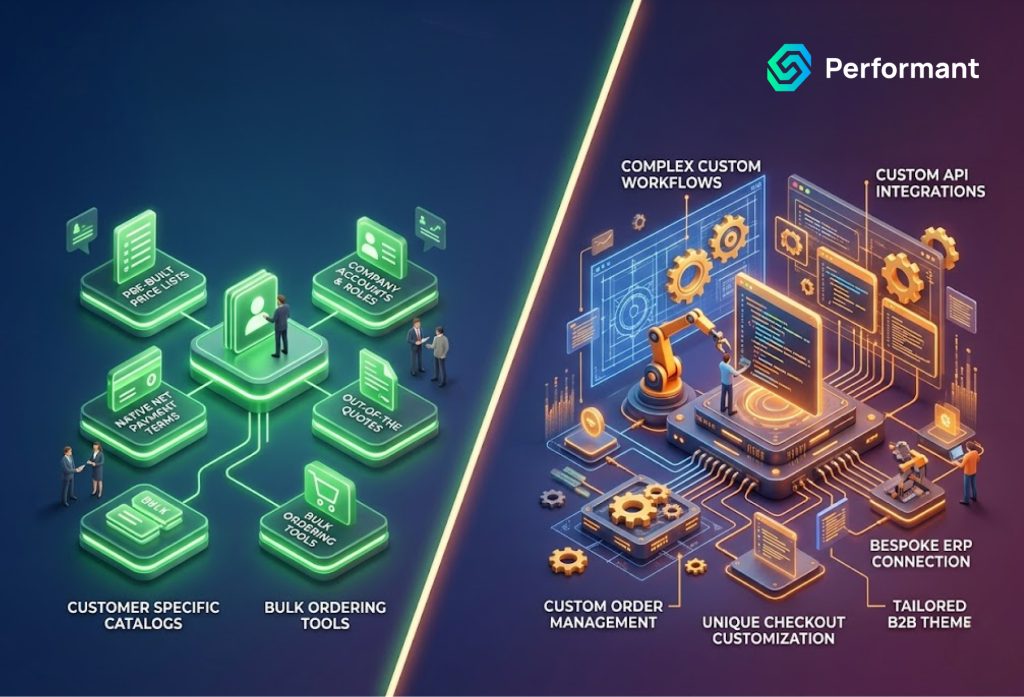
Your Shopify Store Is Not Handling B2B the Way Your Business Operates Here Is What the Platform Provides and Where It Stops The B2B Gap That Costs You Wholesale Customers You are running a Shopify store that serves both retail and wholesale customers or you are preparing to add a wholesale channel to an existing direct-to-consumer operation. Your B2B customers have requirements that your current store configuration does not handle cleanly: account-specific pricing that varies by customer tier or negotiated agreement, minimum order quantities that differ by product category or customer account, net payment terms that cannot be managed through Shopify’s standard checkout, and order workflows that require approval or review before processing. Your operations team is managing the gap between what your store can do and what your B2B customers need through a combination of manual intervention, workarounds, and processes that do not scale. You have heard that Shopify Plus has native B2B functionality. You are trying to determine whether that functionality covers what your business actually requires, or whether you are looking at a significant custom development project to deliver the B2B experience your wholesale customers expect. The answer which is more nuanced than most platform marketing communicates is that Shopify’s native B2B capabilities are genuinely useful and substantially more comprehensive than they were two years ago, but they cover a defined set of use cases and stop at a boundary that many B2B businesses will encounter quickly. Understanding exactly where that boundary sits, what lies on each side of it, and what custom development changes when the native capabilities are insufficient is the information this article provides. What Shopify Plus B2B Provides Natively Shopify’s native B2B functionality, launched as a dedicated feature set for Shopify Plus merchants in 2022 and substantially expanded since, represents a serious platform investment in the wholesale commerce use case. For merchants who were previously managing B2B through workaround architectures, separate password-protected storefronts, customer tag-based pricing apps, or entirely separate Shopify stores, the native B2B feature set delivered a structural improvement that reduced both technical complexity and operational overhead. The centerpiece of Shopify’s native B2B offering is the Company object, a dedicated data entity within the Shopify admin that represents a business customer account with its own structure separate from the standard individual customer record. A Company in Shopify can have multiple contacts associated with it, each with defined roles and permissions. It can have multiple locations, billing and shipping addresses associated with the account at the company level rather than requiring each individual contact to maintain their own address records. It can be assigned a price list that applies specifically to that company’s purchases, ensuring that B2B pricing is account-level rather than requiring individual product price manipulation or app-based workarounds. Price lists within Shopify’s B2B system allow merchants to define either fixed prices or percentage adjustments from retail pricing, applied at the product variant level, for specific company accounts or groups of accounts. This covers the most common B2B pricing model tiered pricing for different customer segments with native platform functionality rather than third-party apps. For merchants whose pricing requirements fit this model, the native price list system eliminates a layer of app dependency and the associated performance and maintenance overhead. Payment terms are a second area where Shopify’s native B2B capability has matured meaningfully. Merchants can assign net payment terms Net 15, Net 30, Net 60, and Net 90 are supported natively to Company accounts, allowing B2B customers to place orders against a credit arrangement rather than requiring immediate payment at checkout. This is foundational B2B functionality that was previously impossible to implement on Shopify without custom development or third-party app support, and its inclusion in the native feature set removes a significant barrier for merchants transitioning wholesale accounts onto the platform. The B2B checkout experience for Company accounts is also differentiated from the standard consumer checkout in the native feature set. Logged-in Company contacts see their account-specific pricing, their assigned payment terms, and their company’s saved addresses automatically without requiring any custom development to surface this information correctly. The checkout recognizes the B2B context and behaves accordingly, which is a meaningful user experience improvement over workaround architectures where the B2B context had to be managed through customer tags, metafields, or app injections. Where Shopify’s Native B2B Capabilities Stop The honest assessment of Shopify’s native B2B feature set requires equal attention to what it does not cover because the boundary between native capability and custom development requirement is where most merchants’ actual operational needs begin to diverge from what the platform provides out of the box. Volume-based pricing is the most commonly encountered limitation. Shopify’s native price lists support fixed prices and percentage adjustments at the variant level for a given company. They do not natively support pricing that varies based on the quantity purchased within a single order the tiered pricing model where a customer purchasing 1–10 units pays one price, 11– 50 units pays a lower price, and 51 or more units pays a lower price still. Volume pricing is a standard commercial expectation in many wholesale categories, and its absence from Shopify’s native B2B feature set means that merchants with volume-based pricing structures require either a third-party app or custom development to implement it correctly. Custom order approval workflows represent a second significant gap. Many B2B operations require orders above a certain value, or orders from certain customer types, to be reviewed and approved by an internal team member before processing. Shopify’s native B2B checkout does not include a native order approval or quote-to-order workflow. Orders placed by Company contacts proceed directly to the standard order processing path. For merchants where quote generation, order review, or multi-stage approval is a standard part of the B2B commercial process, this workflow needs to be built either through a third-party app with meaningful functional limitations, or through custom development that integrates correctly with Shopify’s order management architecture. Customer-specific product catalogs where different B2B accounts see different subsets of the product
Signs Your Shopify Store Has Outgrown Its Setup
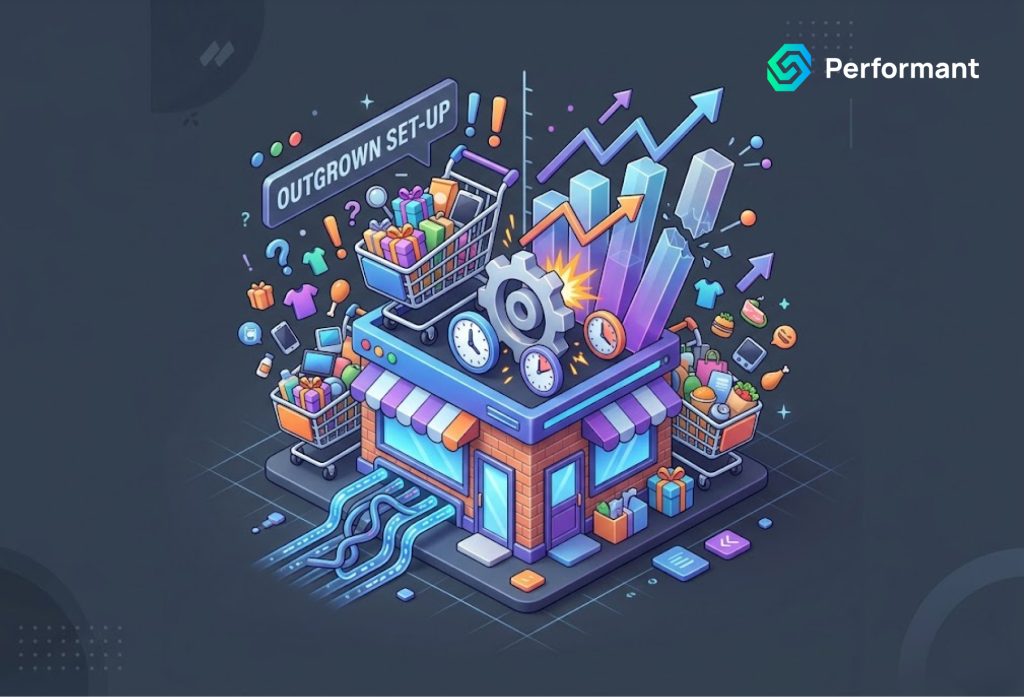
There is a particular kind of operational pressure that builds quietly in a scaling ecommerce business. It does not arrive as a single failure or a clear inflection point. It accumulates in the workarounds your team has stopped questioning, in the reports that never quite reconcile, in the checkout friction you have learned to explain away as normal, in the conversations you keep having about why a process that should take minutes consistently takes the better part of an afternoon. You are doing more revenue than you were eighteen months ago. Your team is larger. Your product catalogue has grown. Your customer base is broader. And yet the business feels more brittle, not more stable. Decisions that used to be straightforward now require manual data gathering across multiple platforms. Staff onboarding takes longer because the systems are more complicated and less coherent. Customer service escalations involve tools that do not communicate with each other. The operational overhead of running the business is growing faster than the business itself. This is not a people problem, and it is not a process problem at least not at its root. It is an infrastructure problem. The Shopify setup that carried you to your current revenue level was designed for a business that no longer exists. The gap between what your store was built to do and what your business now needs it to do is the structural source of almost every operational headache you are experiencing. And unlike a people or process problem, adding more of either will not fix it. This article is for merchants who suspect that the gap is real, want a framework for diagnosing where the structural failures are, and are ready to think seriously about what closing them would require. The Architecture That Got You Here Cannot Take You Where You Are Going Every Shopify store begins as a reasonable approximation of a business. The theme was chosen because it was close enough to the brand vision. The apps were installed because each one solved a real, immediate problem. The configurations were set as best as the tools allowed. And at the time, this was the right approach because the business was simple enough that a collection of reasonable approximations was sufficient to operate it. Growth changes that equation in ways that are rarely sudden and almost always underestimated. Your product catalogue expanded, and with it came variant complexity, bundle logic, and availability states that the standard Shopify product model was not designed to handle cleanly. Your customer segments became more distinct, and the personalisation and pricing logic those segments require cannot be expressed within the settings panels of the tools currently in place. Your fulfillment operations developed edge cases multi-warehouse routing, partial shipments, repair and return flows that the default Shopify order management structure was never designed to accommodate. What emerges from this accumulation is not a series of isolated problems. It is a single structural problem expressing itself simultaneously across performance, operations, reporting, and cost. The storefront is slow because it is carrying too many third-party app scripts. The operations are fragmented because the tools were never designed to integrate with each other. The reporting is incomplete because the data is distributed across platforms that do not share a common schema. The monthly SaaS spend is rising because app pricing scales with revenue, and the stack that costs a manageable sum at lower volume costs significantly more now. Each of these expressions has its own surface-level fix, another optimization pass, another middleware integration, another reporting workaround. But applying surface fixes to a structural problem does not resolve it. It delays it, at increasing cost, until the point where the accumulated weight of those workarounds becomes its own operational burden. The Five Structural Signals Worth Taking Seriously Diagnosing structural outgrowth requires looking at the right indicators. The following are not the only signals worth considering, but they are the ones most consistently present in Shopify stores that have genuinely outgrown their setup. Storefront performance has plateaued despite optimisation effort. If you have worked through the standard performance interventions image compression, theme section reduction, deferred JavaScript and your Core Web Vitals scores remain weak, the remaining performance ceiling is almost certainly your app stack. Every third-party application installed on a Shopify storefront contributes JavaScript execution time, additional DNS resolution, and in many cases render-blocking behaviour. Google’s Largest Contentful Paint and Interaction to Next Paint metrics are acutely sensitive to this accumulated overhead. When theme-layer optimization has reached its limit, the constraint has moved to the infrastructure layer, and the only way to clear it is to address the infrastructure. Your team is operating manual processes that should not exist. When staff members are regularly exporting CSVs to move data between systems, manually copying order details from one platform to another, or maintaining spreadsheets that duplicate information already held in Shopify these are not workflow inefficiencies. They are architectural gaps. The systems do not integrate because they were never designed to. The humans have become the integration layer, and they are absorbing a hidden operational cost that scales linearly with order volume. Your business logic cannot be accurately expressed in your current tools. Tiered B2B pricing that varies by customer segment and order volume. Subscription rules that interact with loyalty tier thresholds. Fulfilment routing logic based on warehouse proximity and real-time SKU availability. If the actual rules your business operates by require workarounds, approximations, or manual overrides to implement within your current configuration, your requirements have outgrown what off-the-shelf tooling was designed to serve. This is not a limitation of Shopify as a platform, it is a limitation of the commodity layer sitting on top of it. Conversion rate has plateaued despite ongoing optimisation investment. There is a category of conversion problem that is not caused by copy, offer, or creative; it is caused by checkout friction, page load degradation, and UX inconsistencies introduced by app conflicts and theme limitations. When a structured test-and-learn programme is producing diminishing
Why ERP Integrations Break on Shopify (And How to Fix Them)
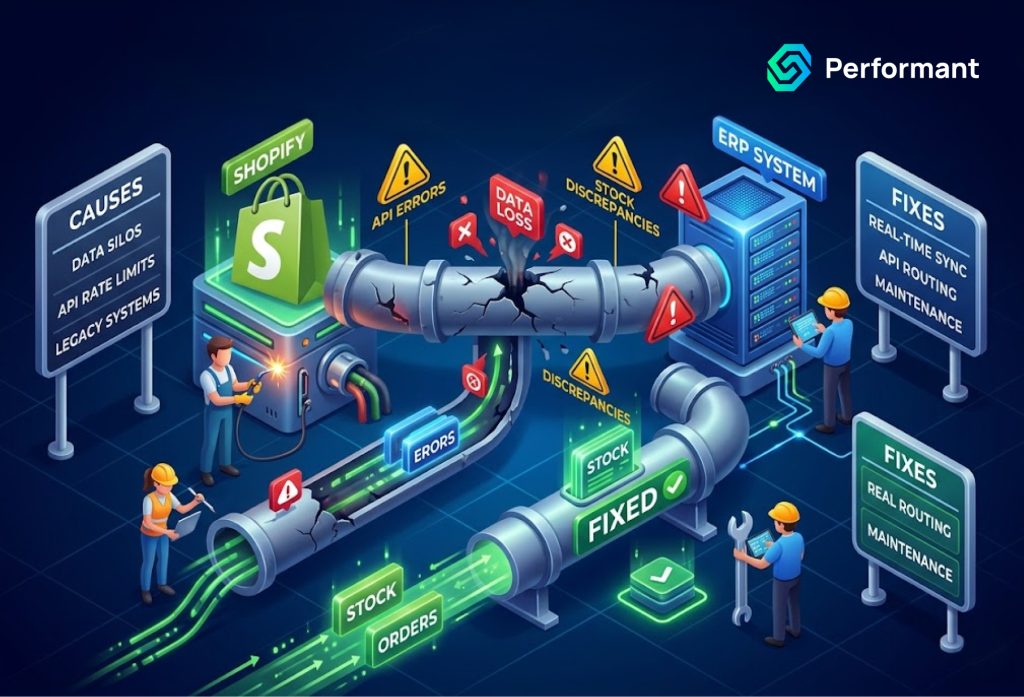
The Integration That Was Supposed to Connect Everything and Doesn’t When your business invested in connecting Shopify to your ERP system, the promise was operational clarity. Orders flowing automatically into the ERP for fulfillment processing. Inventory levels syncing in real time so your storefront never oversells. Customer and pricing data consistent across both systems. The manual work of reconciling two separate platforms was supposed to disappear. What most merchants experience instead is something considerably more complicated. The integration works until it does not. Orders occasionally fail to sync and sit unprocessed until someone notices. Inventory counts drift between the two systems, creating discrepancies that require manual correction. A Shopify update or an ERP version breaks behavior that had been reliable for months. Your operations team has quietly built a set of manual workarounds around the integration’s failure points, and those workarounds have become so embedded in the daily process that no one questions them anymore. This pattern is not the exception for Shopify ERP system integrations. It is close to the norm and it is rooted in specific, identifiable causes that have nothing to do with the quality of your ERP system or the capability of your Shopify store. Understanding those causes clearly is the prerequisite for fixing the integration in a way that holds, rather than patching it in a way that delays the next failure. Why Shopify ERP Integrations Break: The Root Causes ERP integrations fail for reasons that are almost always structural rather than random. When an integration breaks repeatedly, or degrades gradually over time, it is because something in its architecture is misaligned with how either Shopify or the ERP system actually behaves at scale. The most common root causes fall into several distinct categories. API Rate Limiting and Volume Mismanagement is the most frequently encountered failure mode for growing merchants. Shopify’s API imposes rate limits on the number of requests that can be made within a given time window. An integration built when the store was processing fifty orders a day may have been designed without serious consideration of rate limiting — because at fifty orders a day, the limits were never reached. At five hundred orders a day, during a peak trading period or a promotional campaign, the same integration exceeds those limits, requests begin to fail, and orders queue without processing. The integration appears to be functioning from the outside while silently falling behind on the inside. Data Mapping Misalignment is a second fundamental cause. Shopify and ERP systems use different data structures, different field names, and different logic for representing the same commercial concepts. A product variant in Shopify is not the same construct as a stock-keeping unit in most ERP systems. A Shopify order’s tax logic may not map cleanly to the tax fields the ERP expects. Discount structures, shipping cost allocation, multi-currency handling, and bundle or kit product representations all create potential data mapping misalignments that produce incorrect records in one or both systems. The integration transfers data but the data it transfers does not mean the same thing on both sides. Webhook Reliability and Event Handling Gaps represent a third structural weakness. Many Shopify ERP integrations use webhooks automated notifications that Shopify sends to the integration when specific events occur, such as order creation, inventory updates, or customer account changes. Webhooks are efficient, but they are not guaranteed. Shopify’s documentation is clear that webhooks can be missed, delayed, or delivered out of sequence under certain conditions. An integration that relies entirely on webhooks without a reconciliation mechanism, a periodic audit that compares Shopify’s data against the ERP’s data and identifies discrepancies is an integration with a structural gap that will produce data drift over time. Platform Version Changes and API Deprecations are an unavoidable operational reality for any long-running Shopify integration. Shopify evolves its API regularly, deprecating older endpoints and introducing new ones with different behavior. An integration built against a Shopify API version that reaches its end-of-life will begin to produce errors when Shopify stops supporting that version. ERP systems similarly release updates that change their data structures, API behavior, or authentication methods. An integration that was built once and not actively maintained is an integration that is degrading toward its next failure with every platform update that goes unaddressed. Insufficient Error Handling and Monitoring is the cause that makes all of the above problems worse than they need to be. An integration with robust error handling catches failures at the point they occur, logs them with enough context to diagnose the cause, triggers alerts that surface the failure to the operations team immediately, and in many cases retries the failed operation automatically. An integration without this infrastructure fails silently the error occurs, nothing is logged in a way that anyone reviews, no alert fires, and the discrepancy accumulates until it is large enough to be noticed through its commercial consequences rather than through its technical cause. Diagnosing the State of Your Current Integration Before committing to a fix, the current integration needs to be assessed honestly against the failure modes described above. This assessment is more valuable than it might appear, because different root causes require different solutions and the most expensive intervention is rarely the most appropriate one. Start with your error logs. Every integration produces some form of log output. If yours is not being actively monitored if no one on your team is reviewing integration logs on a regular basis the first step is establishing that visibility. What you find in the logs will tell you whether the failures are episodic or continuous, whether they are concentrated in specific operation types, and whether they are growing in frequency. This data shapes everything that follows. Examine the reconciliation gap between your two systems. Compare a sample of Shopify orders from the past thirty days against their corresponding records in the ERP. How many orders are represented accurately in both systems? How many show discrepancies in status, line items, pricing, or customer information? How many
Shopify Checkout Customization: What’s Possible on Plus and What Isn’t?
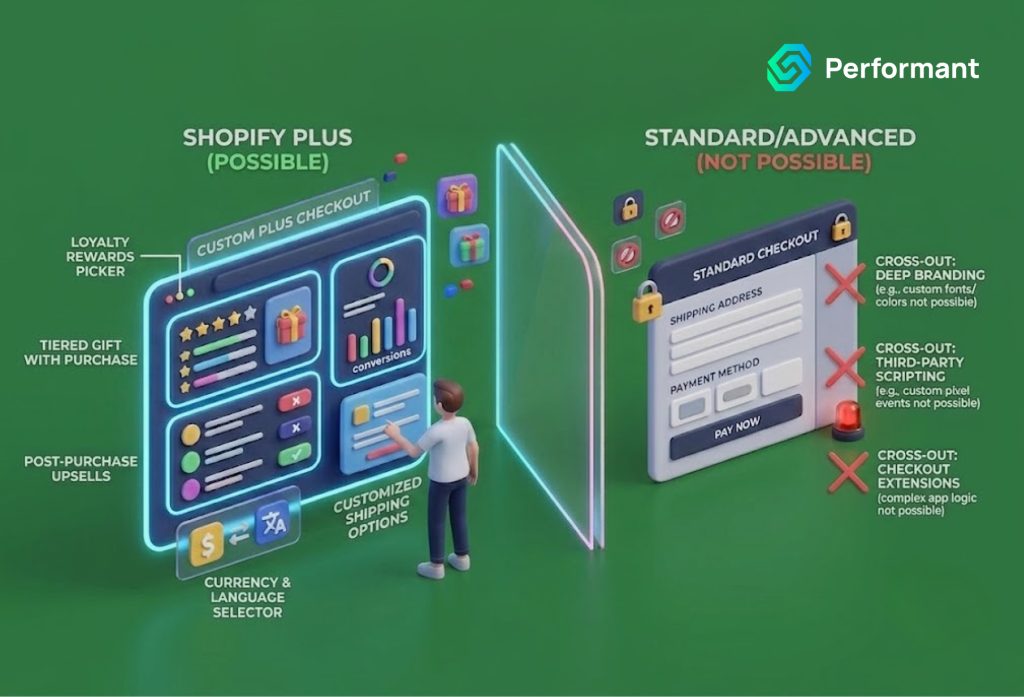
Your Checkout Is Costing You Conversions Here’s What Shopify Plus Actually Lets You Change You upgraded to Shopify Plus, in part, because you were told the checkout was customizable. The limitations constraining your standard plan, the inability to add custom fields, modify the order of checkout steps, inject upsell logic, or control the payment method presentation would no longer apply. So you made the investment, found a development resource, and began scoping what your ideal checkout would look like. And then you discovered that the reality is more complicated than the pitch suggested. Some things that seem straightforward are not supported. Some things that are supported require a level of technical implementation that was not in the original estimate. Some customizations you need require Shopify Functions, some require UI extensions, some require both, and some simply are not possible within Shopify’s architecture regardless of plan tier. Meanwhile, the deprecation of checkout.liquid, the old mechanism through which Plus merchants customized their checkout is either behind you or ahead of you, depending on when you upgraded, and the migration to Checkout Extensibility has changed both what is possible and how you go about achieving it. If you are a Shopify Plus merchant trying to understand with precision what your checkout can actually do, what it cannot do, and what it would take to close the gap between your current checkout experience and the one your business needs, this article is the honest, technically grounded answer you have been looking for. Understanding the Architecture: Why Plus Checkout Customization Is Not What It Used to Be Before evaluating what is and is not possible, it is necessary to understand the architecture because the checkout customization model on Shopify Plus has changed fundamentally, and much of the confusion merchants experience stems from information that was accurate about the old model but is no longer accurate about the new one. Until recently, the primary mechanism for Shopify Plus checkout customization was checkout.liquid a Liquid template file that Plus merchants could edit directly to modify the checkout’s HTML structure, inject custom scripts, add custom fields, and restyle the experience. For developers who knew it well, checkout.liquid was powerful precisely because it was direct: you had access to the template, you could modify it, and the results were immediate and controllable. Shopify deprecated checkout.liquid for new stores in 2024 and has committed to sunsetting it entirely, with existing Plus stores that still use it required to migrate to the new framework. That framework is Checkout Extensibility, a structured, API-driven approach to checkout customization that replaces direct template access with a defined set of extension points, UI components, and serverless functions. The shift from checkout.liquid to Checkout Extensibility is not simply a technical migration. It represents a philosophical change in how Shopify thinks about checkout customization. The old model gave developers direct, unconstrained access to the checkout template. The new model defines specific, supported extension points placed within the checkout flow where custom UI can be injected, and specific logic layers where custom business rules can be applied while Shopify retains control of the checkout’s core structure, performance, and security posture. This means that Checkout Extensibility is both more constrained and more robust than checkout.liquid in different respects. More constrained because you are working within Shopify’s defined extension architecture rather than against an editable template. More robust because Shopify can guarantee checkout performance and PCI DSS compliance across the core flow, and because extensions built within the framework are more maintainable and upgrade-safe than the custom code that accumulated in many merchants’ checkout.liquid implementations over time. Understanding this distinction is the prerequisite to having a productive conversation about what your checkout can actually do. What Checkout Extensibility Actually Enables on Shopify Plus Within the Checkout Extensibility framework, the range of what is genuinely achievable is broader than many merchants initially believe provided the customization fits within the architecture’s defined extension points. Custom UI extensions allow you to inject React-based components into specific locations within the checkout flow. This extension targets defined locations in the checkout, cart, and order status pages where custom UI elements can be rendered. This includes adding custom fields to collect additional information from customers at checkout, injecting upsell or cross-sell offers at defined points in the flow, displaying dynamic content based on cart contents or customer identity, and rendering trust signals, promotional messaging, or custom shipping information in defined positions within the checkout UI. The Checkout Branding API allows Plus merchants to customize the visual presentation of the checkout typography, colour scheme, corner radius, input field styling, button appearance without modifying the underlying structure. This is the mechanism for ensuring checkout visual consistency with your storefront brand. It operates declaratively, meaning you define the design parameters and Shopify’s checkout rendering respects them, rather than requiring you to override CSS directly. Shopify Functions is the mechanism for customising the business logic layer of the checkout. Functions are small, serverless programs that execute within Shopify’s infrastructure and are called at defined points in the checkout and order processing flow. Relevant function types for checkout customization include payment customization showing, hiding, or reordering payment methods based on cart contents, customer attributes, or order value shipping customization, which applies equivalent logic to shipping options; and discount functions, which allow entirely custom discount logic that goes beyond Shopify’s native discount types, including complex tiered pricing, loyalty-based discounts, and B2B-specific pricing rules. Post-purchase extensions allow you to render custom UI on the order confirmation page and post-purchase interstitial the step between order placement and the final confirmation screen providing an opportunity for upsells, cross-sells, loyalty enrolment, and survey collection at the highest-intent moment in the customer journey. Taken together, these capabilities represent a meaningful toolkit for a business with substantial checkout customization requirements. The limitation is not the depth of what is achievable within the framework, it is that the framework defines precisely where and how customization can occur, and requirements that fall outside those defined extension points cannot be
When to Replace Your Shopify App Stack with Custom Tooling
Your Shopify App Stack Is Slowing You Down Here’s How to Know It’s Time to Replace It You started with the right instincts. A plugin for reviews, one for subscriptions, another for upsells, a loyalty tool, a custom reporting add-on, and something to handle your wholesale pricing. Each app solved a real problem at the time you installed it. But somewhere between scaling from six figures to seven or seven to eight the app stack that once felt like an advantage started to feel like scaffolding holding up a building that was never designed to carry this much weight. If your store is experiencing checkout slowdowns you can’t fully explain, staff workflows that require manual workarounds, data that doesn’t reconcile cleanly across platforms, or monthly SaaS fees that are quietly adding up to more than a developer retainer would cost you are not alone, and you are not imagining the problem. What you are experiencing is a structural issue that more apps will not fix. This article is for Shopify merchants who have outgrown the plug-and-play model and are seriously considering what it would mean to replace parts or all of their app stack with purpose-built custom tooling. How to Diagnose Whether the Problem Is Your Apps or Your Operations Before investing in custom development, it is worth being precise about what is actually breaking down. App stack fatigue tends to manifest in one of three ways, and each has a different root cause. The first is performance degradation. Every third-party app installed on a Shopify storefront introduces additional JavaScript, additional HTTP requests, and in many cases, additional render-blocking resources. Individually, the impact is minor. Cumulatively, across eight or twelve apps, it can add seconds to your page load time and in ecommerce, seconds translate directly to lost conversions. Google’s Core Web Vitals framework treats Largest Contentful Paint, Interaction to Next Paint, and Cumulative Layout Shift as ranking signals, which means a bloated app stack is not just a UX problem; it is an SEO problem. The second is workflow fragmentation. When your operations team has to jump between four dashboards to process a return, or your fulfillment staff have to manually reconcile orders between your OMS and your 3PL integration because two apps don’t communicate cleanly, the problem is not the individual apps, it is the absence of a unified system. Each point of friction compounds across hundreds or thousands of monthly orders. The third is cost structure erosion. SaaS pricing is designed to scale with your revenue. What costs $49 a month at $500K annually often costs $299 or more at $3M. Multiply that across a stack of ten apps and the economics shift considerably. Many merchants reach a crossover point typically somewhere between $2M and $5M in annual revenue where the cumulative subscription cost exceeds what a well-scoped custom build would cost over the same period. What “Custom Tooling” Actually Means in a Shopify Context There is a meaningful difference between replacing your entire tech stack and replacing the parts of it that are causing the most pain. Custom tooling in a Shopify context can mean several things: a private Shopify app that replicates the logic of a third-party tool but is built to your exact business rules; a custom storefront built on Shopify’s Hydrogen framework that eliminates the theme-layer constraints causing your performance issues; a headless architecture that decouples your frontend entirely from the Shopify admin; or a set of backend integrations built on Shopify’s Admin API or Storefront API that replace several disconnected apps with a single, coherent data layer. None of these options requires migrating away from Shopify. In the vast majority of cases, the recommendation is to stay within the Shopify ecosystem and use its APIs as the foundation, replacing problematic third-party dependencies rather than the platform itself. Working with a qualified Shopify developer partner is essential at this stage. The distinction matters because a development agency without platform specialization may propose solutions that technically work but violate Shopify’s API rate limits, fail under high-traffic conditions, or create long-term maintenance liabilities. A genuine Shopify developer partner has demonstrated technical competency on the platform, has access to early API features, and operates with the kind of architectural judgment that prevents the replacement stack from developing the same problems as the original one. The Five Signals That Indicate You Are Ready for Custom Development Readiness for custom tooling is not purely a question of revenue. It is a question of operational maturity, technical stability, and business clarity. Merchants who attempt custom development before they have stable core processes often spend significant budget solving problems that would have resolved themselves operationally. Signal one: Your business logic is genuinely non-standard. If your pricing model, fulfillment rules, subscription structure, or B2B workflows cannot be configured within the settings of existing apps without forcing workarounds, that is evidence that your requirements have outgrown what the app ecosystem was built to serve. Signal two: You have recurring manual processes tied to app limitations. If your team is regularly running CSV exports, copy-pasting between systems, or doing manual reconciliation because two apps don’t integrate and this work happens daily or weekly you are absorbing a hidden operational cost that custom integration would eliminate. Signal three: A single app failure causes material business disruption. When your subscription app goes down during a billing cycle, or your review platform makes a unilateral change to its pricing model, or your loyalty tool is acquired and sunsetted and any of these events would cause a meaningful operational or revenue problem your dependency on third-party infrastructure has become a business risk, not just a technical inconvenience. Signal four: Your store’s performance score has plateaued despite theme optimization. If you have already optimized your theme, deferred non-critical JavaScript, and compressed your media assets and your Core Web Vitals scores are still weak the remaining performance ceiling is almost certainly being imposed by third-party app scripts. Custom tooling removes that ceiling. Signal five: You are spending more
Custom WooCommerce Reporting: Why Default Analytics Fall Short
Running an eCommerce business today demands more than gut instinct. Every pricing decision, every marketing investment, every inventory call carries financial consequences and the quality of your decision-making is only as strong as the quality of data behind it. Yet thousands of business owners operating on WooCommerce are making critical decisions based on reports that, by design, were never built for serious commercial use. WooCommerce is a powerful platform. It has earned its place as the world’s most widely used eCommerce solution, powering over 6 million online stores. Its default analytics dashboard gives you the basics: total revenue, order counts, top products, stock status. For a store just getting started, that may feel like enough. But as your operation scales as your product catalog deepens, your customer base diversifies, and your marketing channels multiply those default numbers stop telling you what you actually need to know. This article is for business owners who have outgrown surface-level analytics. It examines precisely where WooCommerce’s native reporting falls short, what that costs you in real business terms, and why investing in custom reporting solutions through professional WooCommerce development services is not a luxury but a strategic necessity. What WooCommerce’s Default Analytics Actually Gives You Before criticizing the tool, it is only fair to understand what it was designed to do. WooCommerce ships with a built-in analytics module that covers several standard dimensions: Revenue and orders total sales, net revenue, average order value, and order volume over selectable date ranges. Products Top selling items by quantity and revenue, with basic stock information. Customers New versus returning customer counts, and a rudimentary customer list. Categories and coupons performance breakdowns by product category and coupon code usage. For a store generating a few thousand dollars a month with a handful of SKUs, this is a serviceable overview. The moment complexity enters the picture multiple sales channels, seasonal demand patterns, multi-tiered pricing, subscription products, B2B accounts, or regional performance differences the default reports become not just insufficient, but actively misleading. The Six Critical Gaps in WooCommerce’s Native Reporting 1. No True Customer Lifetime Value Analysis Default WooCommerce analytics can tell you how many customers placed orders this month. What it cannot tell you is the long-term revenue value of those customers. Customer Lifetime Value (CLV) is arguably the single most important metric for any eCommerce business because it determines how much you can afford to spend on customer acquisition. Without CLV data segmented by acquisition channel, product category, geography, or customer cohort, your marketing budget allocation is, at best, an educated guess. A business spending equal amounts to acquire customers from paid search and organic social without knowing that paid search customers have triple the lifetime value is leaving significant profit on the table. This is the kind of insight that custom reporting built through dedicated WooCommerce development services can surface within weeks of implementation. 2. Absence of Cohort Analysis Cohort analysis groups customers by the time period in which they first purchased and tracks their behavior over subsequent months. It tells you whether the customers you acquired during your summer sale are still buying six months later, or whether they were one-and-done bargain hunters. It reveals whether your retention is improving or degrading quarter over quarter. WooCommerce provides no native cohort reporting. None. This gap is particularly damaging for businesses that invest heavily in promotions or paid acquisition campaigns because it makes it impossible to evaluate whether those campaigns built lasting customer relationships or simply generated short-term revenue spikes. 3. Inventory Intelligence Is Superficial The default WooCommerce stock report tells you which products are low on inventory. It does not tell you how fast they are selling relative to historical patterns, whether you are approaching a stockout ahead of a peak season, which products are slow-moving capital tied up in your warehouse, or which variants of a product family are cannibalizing each other. For any business with more than fifty SKUs, inventory management without granular velocity data is genuinely risky. Stockouts cost revenue. Overstocking destroys cash flow. Intelligent, custom inventory reporting integrated directly into your WooCommerce backend can transform this reactive process into a proactive one. 4. No Meaningful Attribution Reporting Where did your customers come from? The honest answer, looking at WooCommerce’s default reports, is: you don’t really know. The platform does not provide multi-touch attribution modeling. It cannot tell you that a customer first discovered your brand through an Instagram ad, revisited via organic search three times, and finally converted through a retargeting email and that all three touchpoints contributed to the sale. Without attribution clarity, marketing optimization is impossible. Businesses routinely over-invest in last-click channels (usually direct traffic or branded search) and under-invest in upper-funnel discovery channels that are actually driving the pipeline. Custom reporting that integrates WooCommerce data with your advertising platforms, email system, and analytics stack solves this problem directly. 5. Profitability Data Is Entirely Absent This is perhaps the most glaring omission. WooCommerce reports revenue. It does not report profit. The two numbers are not the same, and for many businesses, they tell very different stories. A product generating your highest revenue might be your least profitable after accounting for cost of goods, shipping, returns, and payment processing fees. A mid-tier product with lower volume might be your highest-margin item. Without profitability reporting layered onto your sales data, you are optimizing for the wrong number potentially scaling the parts of your business that are quietly draining your margin. Building a custom profit-reporting layer requires integrating your cost data into WooCommerce’s order data. This is precisely the kind of architecture that professional WooCommerce development services are positioned to design and implement. 6. Reporting Cannot Scale With Your Business There is a structural limitation built into WooCommerce’s reporting module that goes beyond any single missing metric: it cannot be customized without development work, it does not connect natively to business intelligence tools, and it performs poorly as your order volume grows. Stores processing tens of thousands of orders a month will
Custom WooCommerce Development vs WordPress Templates: What Every Business Owner Needs to Know
Every business owner building an ecommerce store on WordPress faces the same decision at some point: do you buy a pre-built template and customize it yourself, or do you invest in a store built from the ground up to your specifications? It seems like a straightforward question. In practice, it is one of the most consequential technical decisions you will make and getting it wrong is far more expensive than most business owners anticipate. This article does not declare a universal winner. The honest answer is that the right choice depends entirely on your business model, your growth trajectory, and the role your online store plays in your revenue strategy. What this guide will do is give you the framework to make that decision with clarity and help you understand exactly what you are trading off when you choose one path over the other. The Appeal of WordPress Templates and Why It Has Limits Let us start with the case for templates, because it is genuinely compelling for a significant number of businesses. Pre-built WooCommerce themes have improved dramatically over the past few years. Premium options from established developers themes like Flatsome, Kadence, Divi, and Astra are well-coded, mobile-optimised, and designed with ecommerce conversion in mind. They ship with starter templates that allow a business owner to have a functioning online store live within days rather than months. The upfront cost is a fraction of custom development, often falling between $50 and $300 for a premium licence. For a business that is validating a product idea, testing a new vertical, or operating a small catalogue with standard requirements, a well-chosen template is a rational and efficient choice. The problems emerge not at launch, but at growth. Templates are built to serve the broadest possible market. Every feature, layout option, and design element they include exists because enough customers requested it to justify its development. This universal scope comes with a cost: code bloat. Every option your store does not use still loads in the background, contributing to slower page speeds and heavier page weight. As your catalogue expands, as traffic increases, and as your business logic becomes more complex, that underlying inefficiency compounds. There is also the question of differentiation. A template that has been purchased by tens of thousands of merchants means your store shares its structural DNA with a very large number of competitors. You can customize colours, fonts, and imagery but the underlying layout patterns, the checkout flow, the product page architecture remain largely fixed by the template’s original design decisions. For businesses where the customer experience on-site is a competitive advantage, this constraint becomes increasingly problematic over time. What Custom WooCommerce Development Actually Means Custom development is a term that gets used loosely, so it is worth defining precisely what it means in the context of a WooCommerce store. At its most basic level, it means the development team writes code specifically for your store rather than modifying an existing theme. Your child theme, or a fully bespoke theme, is engineered to serve your specific business requirements. Custom templates are built for your product pages, your collection pages, your checkout flow. The architecture is designed around your catalogue structure, your customer journey, and your conversion goals not around the needs of an anonymous global market. At a deeper level, custom development means your store’s backend logic can be extended far beyond what off-the-shelf plugins provide. Complex pricing rules, subscription models, wholesale portals, custom product configurators, multi-warehouse inventory management, API integrations with your ERP or CRM these are all within scope when you are working with a team delivering dedicated WooCommerce development services. With a template, you are assembling these capabilities from a stack of plugins that may or may not work coherently together and will certainly not be optimised for your specific setup. Performance: Where the Gap Becomes Visible One of the most consequential differences between a template-based store and a custom-built one is performance and performance, in ecommerce, translates directly to revenue. Google’s Core Web Vitals are now a confirmed ranking factor, and the metrics they measure Largest Contentful Paint, Cumulative Layout Shift, Interaction to Next Paint are directly affected by the quality of your theme code and the number of scripts your pages load. A typical premium WooCommerce theme with a standard plugin stack loads a significant amount of unused code. Every plugin you install adds its own CSS and JavaScript to your page load, regardless of whether that code is needed on the specific page being rendered. Over time, as you add functionality through new plugins, this overhead accumulates. A custom WooCommerce store is built to load only what is needed, on the pages that need it. The codebase is lean by design. Custom functionality is implemented as targeted solutions rather than broad plugins with features you do not use. The result is a measurably faster store and faster stores convert better. Research consistently shows that even a one-second improvement in page load time can increase ecommerce conversions meaningfully, particularly on mobile devices. This is not a theoretical advantage. It is one of the most frequently cited outcomes reported by businesses that transition from template-based stores to stores built through professional WooCommerce development services. SEO: Why the Architecture of Your Store Matters WooCommerce on WordPress is widely regarded as one of the strongest ecommerce platforms for organic search but that advantage is not automatic. It depends on how the store is built. Template-based stores often suffer from structural SEO issues that are difficult to resolve without rebuilding from scratch: poor heading hierarchies baked into the theme’s HTML, bloated page weight that damages Core Web Vitals scores, CSS and JavaScript that is not properly deferred or minified, and product pages that lack the granular control needed to implement advanced schema markup effectively. Custom development allows you to build SEO architecture directly into the store’s foundation. Heading structures are semantic and purposeful. Schema markup for products, reviews, breadcrumbs, and FAQs can be implemented at
WooCommerce Database Optimization for High SKU Stores
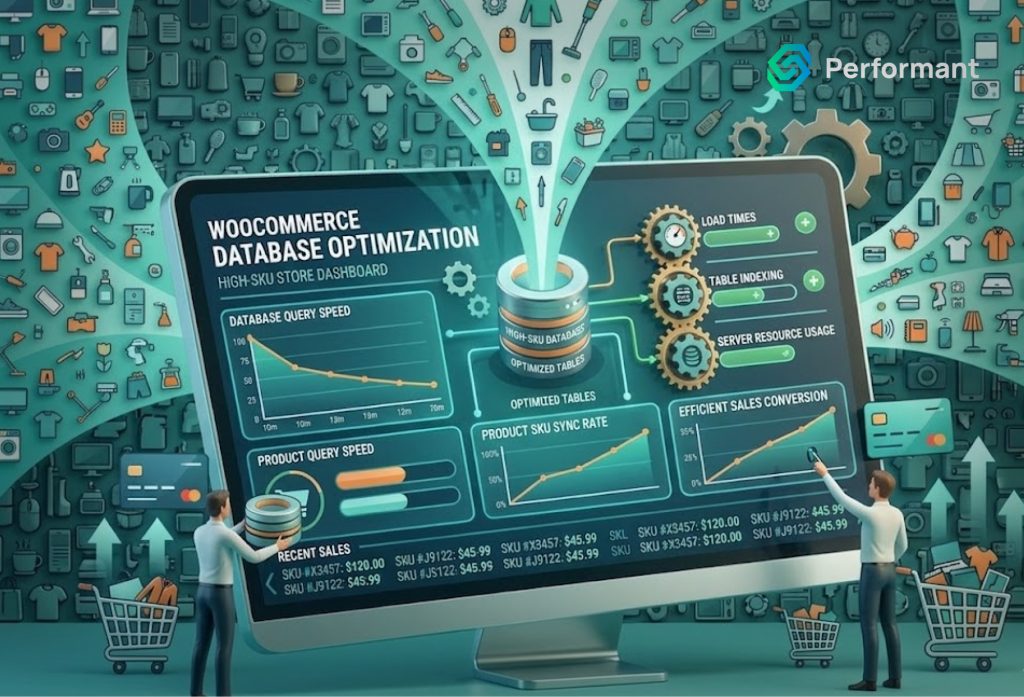
As your WooCommerce store grows, success introduces a new kind of pressure. More products, more customers, more orders on the surface, these are all positive signals. But underneath, your database begins to carry a heavier load. For stores with large product catalogs, often referred to as high SKU stores, database performance becomes one of the most critical factors in sustaining growth. Many business owners focus on design, marketing, or plugins when performance issues appear. But from a senior engineering perspective, the real bottleneck is often deeper. It sits in how your database is structured, queried, and maintained. If your store is slow, inconsistent, or struggling under load, database inefficiency is likely a major contributor. Understanding how to optimize your WooCommerce database is not just a technical improvement, it is a direct investment in revenue stability and scalability. Why High SKU Stores Face Unique Challenges A small WooCommerce store with a few hundred products operates very differently from one with tens of thousands of SKUs. Every product adds rows to multiple database tables. Variations multiply this further. Attributes, pricing rules, stock levels, and metadata all increase the volume of stored data. Over time, the database grows not just in size, but in complexity. When a customer visits your store, the system must retrieve product information, filter results, calculate pricing, and render pages in real time. With a large catalog, these operations require more queries and more processing power. The issue is not just scale. It is how efficiently your system handles that scale. Professional woocommerce development services often find that high SKU stores are not inherently slow; they are simply unoptimized for the level of complexity they have reached. The Hidden Role of the Database in Performance Most business owners think of performance in terms of page speed. But page speed is a result, not a cause. Behind every product page, category filter, or checkout action is a series of database queries. These queries retrieve and process the information needed to display content and complete transactions. If queries are inefficient, everything slows down. Pages take longer to load. Filters lag. Checkout becomes inconsistent. In high SKU environments, even small inefficiencies are amplified. A query that takes 50 milliseconds at low scale might take several seconds when dealing with large datasets. This is why database optimization is foundational. Without it, no amount of frontend improvement or hosting upgrades will fully solve performance issues. Understanding WooCommerce Database Structure WooCommerce operates on top of WordPress, which uses a generalized database structure. While flexible, this structure was not originally designed for large-scale ecommerce. Product data is stored across multiple tables, including posts, postmeta, terms, and term relationships. This design allows for extensibility, but it also creates complexity. For example, product attributes and variations are often stored as metadata rather than structured fields. This means queries must search through large volumes of meta records to retrieve relevant data. As your catalog grows, these queries become heavier and slower. Experienced woocommerce development services understand how to work within this structure while minimizing inefficiencies. They focus on optimizing how data is stored and accessed rather than simply adding more resources. Query Optimization: The First Priority The most immediate performance gains often come from optimizing database queries. Every time a page loads, multiple queries are executed. Some are essential, others are redundant or inefficient. Common issues include: In high SKU stores, these inefficiencies multiply quickly. Query optimization involves identifying slow queries and improving how they are executed. This may include adding indexes, restructuring queries, or caching results. Professional woocommerce development services typically begin performance work with query analysis because it delivers measurable improvements quickly. Indexing: The Foundation of Speed Indexes are one of the most powerful tools for database optimization. Without indexes, the database must scan entire tables to find matching records. With indexes, it can locate data almost instantly. In WooCommerce, indexing is especially important for: However, indexing must be done carefully. Too few indexes lead to slow queries. Too many can slow down write operations such as order creation. A balanced indexing strategy ensures that frequently accessed data is optimized without introducing new bottlenecks. This is an area where experienced woocommerce development services bring significant value, as improper indexing can create more problems than it solves. Managing Product Variations at Scale Variations are one of the biggest contributors to database growth. A single variable product can generate dozens or even hundreds of variation records. Each variation includes its own metadata, pricing, and stock information. For high SKU stores, this quickly becomes a major performance challenge. Optimization strategies include: Reducing unnecessary variations. Not every attribute combination needs to exist as a separate record. Simplifying product structures can significantly reduce database load. Using efficient attribute structures. Organizing attributes in a way that minimizes query complexity improves performance during filtering and display. Cleaning up unused variations. Over time, many stores accumulate obsolete or unused variation data that continues to consume resources. Professional woocommerce development services often restructure product data models to handle variations more efficiently, especially for large catalogs. Database Cleanup and Maintenance As WooCommerce stores operate over time, the database accumulates unnecessary data. This includes: While each item may seem small, collectively they can significantly impact performance. Regular cleanup reduces database size and improves query efficiency. It also ensures that the system is working with relevant data rather than processing outdated records. However, cleanup must be done carefully. Removing the wrong data can disrupt functionality. Structured maintenance processes, often implemented by woocommerce development services, ensure that cleanup is both safe and effective. Caching Strategies for High SKU Stores Caching reduces the need to repeatedly query the database. For high SKU stores, caching is essential for maintaining performance under load. There are several types of caching to consider: Object caching stores query results in memory, reducing database load for repeated requests. Page caching improves frontend performance by serving pre-rendered content where possible. Fragment caching allows dynamic pages to cache specific sections while keeping critical elements real-time. However, WooCommerce presents